

Independent filmmaking has always involved showing people something before the real thing exists. A director may use reference photos, rough storyboards, location stills, mood reels, or a few lines of script to help collaborators understand the tone. None of those materials are the film. They are tools for conversation.
That is the most useful way to think about AI video drafts. They should not be treated as a replacement for cinematography, editing, performance, or production design. But in the right place, they can help a small team talk about mood and movement before money is spent on a shoot.
For indie filmmakers, the question is not whether AI can make a finished film. The better question is whether a rough draft can help the team make better creative decisions earlier.
Previsualization Is a Conversation Tool
Previsualization does not need to be polished to be useful. A rough sketch can help a cinematographer understand framing. A mood board can help a producer understand the atmosphere. A short test clip can help a director explain pacing or camera movement.
Small productions often need this kind of communication because time is limited. A team may have one location window, a small crew, and very little room for confusion once everyone arrives on set.
An early visual draft can help answer practical questions:
- Is the scene supposed to feel restrained or heightened?
- Does the camera move or stay still?
- Is the lighting natural, stylized, warm, or harsh?
- Does the image suggest the right genre?
- Is the idea clear enough to pitch?
These are not final-output questions. They are planning questions.
Where AI Video Drafts Can Help
AI video tools are most interesting in pre-production when they are used to test direction rather than replace production. A filmmaker might use a prompt-based draft to explore whether a scene should feel lonely, tense, intimate, or surreal. A producer might use a rough visual to help explain a pitch deck. A social team might test whether a teaser concept has the right mood before asking for a more polished edit.
In that context, an AI Video Editor can be considered one accessible way to experiment with short visual drafts. The value is not that the draft is ready for the festival circuit. The value is that it gives the team something to react to.
Sometimes the reaction will be, “That is close.” Sometimes it will be, “That is completely wrong, but now we know what to avoid.” Both outcomes can be useful before production begins.
A Small Test Shows the Right Boundary
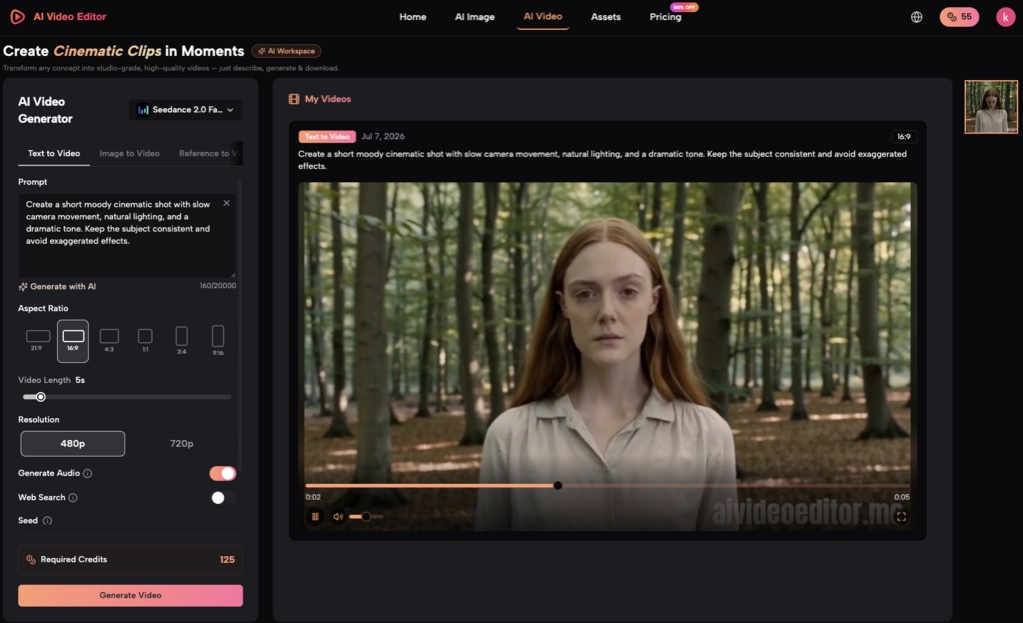
For this article package, a light text-to-video test was recorded on July 7, 2026. A prompt asked for “a short moody cinematic shot with slow camera movement, natural lighting, and a dramatic tone.” The visible interface showed Seedance 2.0 Fast, Text to Video mode, 16:9 aspect ratio, 5-second length, 480p resolution, Generate Audio on, Web Search off, and 125 required credits.
The visible result frame showed a cinematic-style portrait subject in a forest setting, with natural lighting and a restrained dramatic tone. It also included an aivideoeditor.me watermark.
That is enough to support a modest observation: the workflow produced a visible cinematic draft frame from a short prompt. It is not enough to claim that the full clip had smooth camera movement, production-ready continuity, usable audio, or final film quality. Those claims would require reviewing the exported video itself.
This is exactly the kind of boundary filmmakers should keep in mind. A visible draft frame can help a conversation. It should not be confused with a finished shot.
The Filmmaker’s Eye Still Matters
Film is not only the image. It is performance, timing, blocking, sound, editing, and intention. A generated clip may suggest a mood, but it does not know the emotional logic of a scene. It does not know what happened two pages earlier in the script. It cannot decide whether the camera should hold because the character is lying or move because the scene is breaking open.
That is why a Video Editor AI belongs in a supporting role for this kind of work. It can help generate something to discuss. It can help a team test a direction. It may even help with early teaser concepts or pitch visuals. But the director and editor still need to decide what serves the story.
For a small production, that can be the useful balance: use the draft to start the conversation sooner, then let the craft determine what survives.
Practical Uses for Indie Teams
AI video drafts may be most useful for:
- mood references before a location scout;
- pitch-deck visuals for tone;
- rough teaser concepts;
- shot-direction conversations;
- early social content ideas;
- comparing two different visual approaches before a shoot.
They are less appropriate for:
- final performance shots;
- rights-sensitive footage;
- scenes requiring exact continuity;
- legal or commercial claims;
- replacing an editor’s final cut;
- making promises to investors or collaborators about finished quality.
Used carefully, these drafts can reduce ambiguity. Used carelessly, they can create false confidence.
A Film-First Checklist
Before using AI video drafts in previsualization, ask:
- What decision is this draft supposed to help with?
- Is the draft about mood, movement, pitch, or final output?
- Who needs to review it?
- What parts of the image are only placeholders?
- Are there rights or consent issues?
- What must be recreated by real production craft?
- Would a storyboard, reference photo, or live test be clearer?
The point is not to let software lead the film. The point is to give filmmakers another rough tool for shaping the conversation. For indie teams, that can be enough: a way to explore tone before the shoot, without mistaking the exploration for the finished work.